Office 2013: Microsoft's bid to win the future
Cloud, touch, social, and app streaming are the cornerstones of the next Office.

The opening splash for Microsoft's streaming install for Office 2013 is confident you'll love it.
That role is especially heightened for Office 2013, the next version of Office being unveiled today at an event in San Francisco (where CEO Steve Ballmer said, "We feel a lot like it's 1995." You can interpret for yourself now that the preview is live, available atoffice.com/preview). Ars got an advance preview of the vastness of Office 2013; Peter Bright and I have spent the last week mapping its previously unknown territory. Some areas of the suite remain Terra Incognita, mostly because Microsoft didn't have everythingquite ready for the press to look at in advance of the super-top-secret unveiling, but the suite's basic outlines are now clear.Microsoft Office is the Tonto to Windows’ Lone Ranger—it gets beat up and disparaged by the townsfolk, but in the end it saves Windows’ bacon over and over. While Windows releases are shiny, hype-inflated events, Office does the dirty work of getting users comfortable with each new generation of user interface changes. Office provides the features that gradually convince OS holdouts to move on (well, at least as soon as Service Pack 2 ships).
Some applications have gotten a fresh coat of paint and not much in the way of new functionality. That's subject to change; Lync and OneNote, for example, are far from the final form they'll take when they ship. Other programs have received a raft of feature tweaks and incremental innovations that make them significant enough improvements to warrant an upgrade. But we found that the most dramatic changes were not in any application-specific feature, but in the structure and packaging of the whole. Microsoft has tightly bound cloud, Internet services, and social networking to the Office platform.
Microsoft has also fundamentally changed how most consumers and businesses will buy the package: not as a one-shot disk in a box but as a streamed subscription service.
The changes are part of a much bigger strategic shift for Microsoft. Office 2013 is more than just a refresh of Microsoft’s nearly ubiquitous productivity applications. Microsoft is clearly counting on Office 2013 to be a fulcrum point for the company’s whole Windows and cloud platform strategy: moving from a PC-centric worldview to an ecosystem of devices; moving from older Windows versions to Windows 8; and moving from software sales toward cloud-driven subscriptions.
While Windows 8 may be the big circus tent in that strategy, Office makes up most of the tent poles:
- To lift Microsoft’s mobile and tablet aspirations, components of Office will be baked into every Windows RT device, and versions of the core applications will be available for Windows Phone.
- To coax adoption of Windows 8 on the PC, Microsoft is offering enhanced features (particularly around touch and pen-based interfaces) on the new operating system, and Metro versions of two applications to show off the potential of the Metro interface.
- To give third-party service developers and channel partners a better way to build add-on services to Office (and generate continuous revenue), Microsoft has created a new Office service integration API (code-named Agave) based on HTML5 and JavaScript, while keeping the legacy Visual Basic for Applications support intact.
- And by offering Office as part of a subscription service tied to the Office 365 platform—both for consumers and businesses—Microsoft hopes to preserve its desktop dominance against other cloud-based challengers like Google Apps and to fundamentally change the economics of its application software business.
As a result, Office 2013 looks like a bridge between Microsoft’s legacy desktop world and the company’s vision of a hybrid client/cloud future. Hey, Office team: no pressure, right?
To effectively test the preview of Office, we installed it on a number of platforms: Samsung Windows 8 tablets were provided on loan by Microsoft for testing the Office tablet experience, and we installed the suite on Windows 8 and Windows 7 desktops as well. The preview also included accounts on a pre-release version of the updated Office 365 Web service, and Peter Bright and I both connected our installations to our "legacy" Exchange environments for testing. A number of things weren’t cooked in time for our preview, but they were teased by Microsoft in a private demo; we couldn't test them, so I've mentioned them only briefly.
We’ll present separate previews of each of the major Office 2013 applications, but in this article, I’ll take a broader look at the suite as a whole, including the revamped Office 365. The idea is to find out whether Office 2013 can effectively bridge all of the pieces of Microsoft’s platform strategy—or whether it’s a bridge to nowhere.
The answer to that question depends on whether you share Microsoft’s vision of a Windows-driven world. Many organizations will benefit in some way from drinking Microsoft’s Windows/Office/Cloud kool-aid, but the changes here may also evoke the same confusion among users that came out of Microsoft’s last major Office interface change in 2007. For others who upgraded two years ago (or sooner), however, the changes may not be compelling enough to upgrade—or to pick Microsoft over another cloud solution.
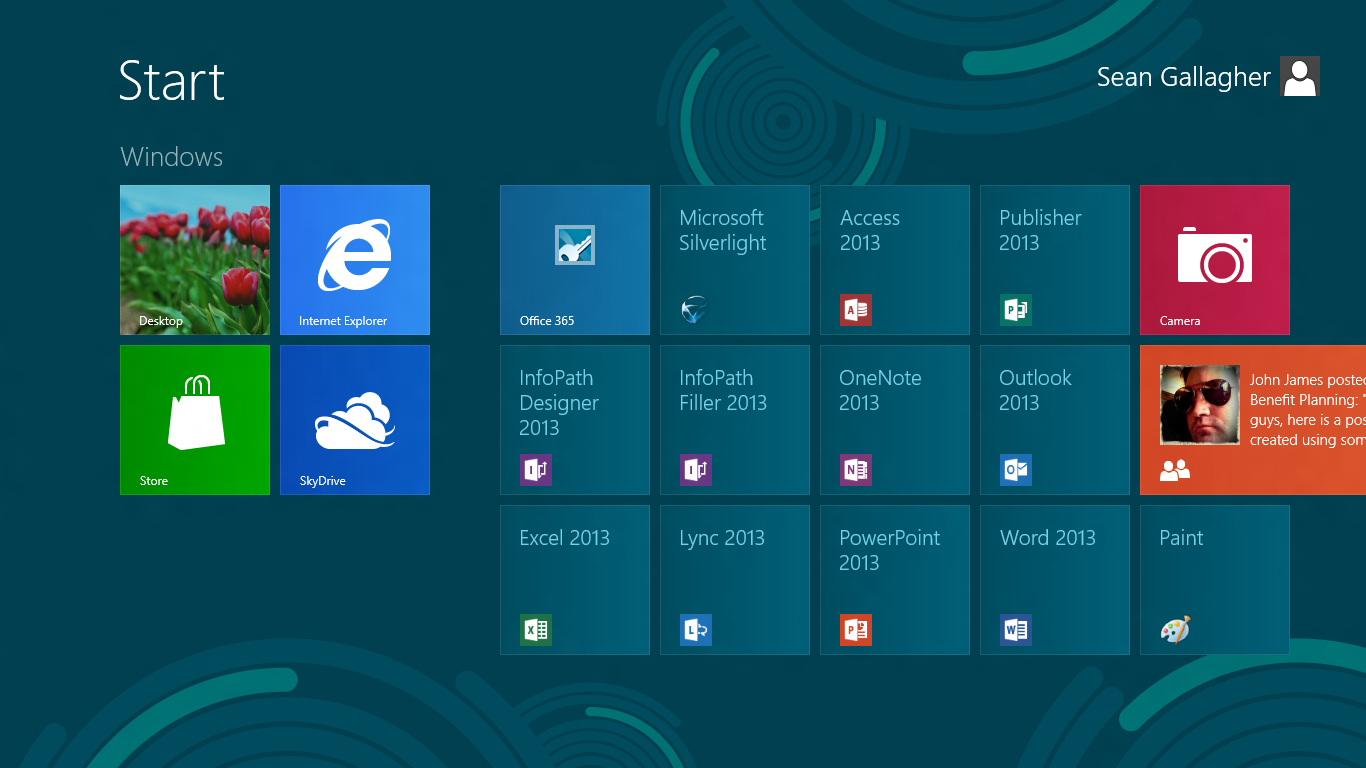
Enlarge / The ten tiles of Office 2013, plus a link to the Office 365 service. Silverlight photobombed the group shot.
The Office vision quest
Planning for Office 2013 began in parallel with the Windows team’s planning for Windows 8, said Microsoft Vice President for Office P.J. Hough during a private briefing on the new Office platform. "When we started planning," Hough told me, "we were both sampling the market to determine which big shifts we wanted to take advantage of."
That parallel planning resulted in both teams focusing on three major areas. The first was what has infamously become known as the "consumerization of IT"—including the rise of mobile devices and tablets. "Before any of the current generation of tablets had shipped, we saw this opportunity in the proliferation of devices," Hough said. Whatever the Office team did, it needed to embrace mobile devices and tablets—not just x86 tablets, but ARM devices and phones as well.
Microsoft had an internal debate over whether touch or voice recognition would be the next important interface. Touch won out, both on the Windows 8 and Office teams, and that choice heavily influenced the design of the application interfaces for the Office apps—they needed to work well both as traditional PC applications with mouse and keyboard, and as touch (and pen) applications on tablets.
Both the Windows and Office teams also saw "a lot of opportunity around people and social networks," Hough said, "both in consumer and with the leading edge starting to encroach on the enterprise." That interest in social networking has already expressed itself through Microsoft’s recent acquisition of Yammer and its continuing relationship with Facebook.
Some social networking integration had already worked its way into Office through Outlook’s “Social Connector” integration with its contact management. But Office 2013 takes social networking and collaboration features even further, integrating them into the interface of most of the Office applications. Microsoft has also added social network-like features such as “following” and status updates to a revamped version of the Office 365 cloud service now in preview.
But perhaps the biggest trend that Microsoft wanted to build deeper into Office was cloud and Internet services. Hough said that Microsoft had already heavily invested in the cloud during in Office’s last generation—through services like Office 365 and SkyDrive. But in the new version of Office, cloud and Internet services (both Microsoft’s and those of its partners) are front and center. Perhaps the most obvious way that this has happened is in the evolution of how Microsoft plans to distribute Office 2013: as a subscription service, streamed from the cloud.

The Office 15 Technical Preview includes desktop versions of Access, Excel, InfoPath, Lync, OneNote, Outlook, PowerPoint, Publisher and Word, with Metro-style interfaces - collectively they're all part of the Office 2013 suite.
One major difference with Office 2013 is that there's a new way of buying it. Although boxed copies and online downloads are still available, you can also get an Office 365 subscription that gets you all Office core apps for all the platforms you use (there are Home, Small Business, ProPlus and Enterprise plans to choose from). Instead of having to pay again for Mac Office or the iPhone OneNote app, you just get them all.
Office 2013 release date and price
Microsoft isn't yet talking about price, or when we'll see these new Office apps. We do know that the Windows RT version of Office will be included when the Surface tablet ships, which Microsoft said would be when Windows 8 is generally available (so sometime between July and October according to our predictions) – but those could be preview versions of the apps, and the expectation is that Office 2013 itself may not be launching until (as the name suggests) early 2013.

Office 2013 is on demand
"You're buying Office for yourself, not for a device," Office general manager Chris Pratley told TechRadar. No news on whether that includes new Office apps for iPad, but if it does, you won't pay any extra for them.
And on Windows at least you don't have to install the apps the traditional way; when you open a document, the application streams down automatically from the Internet and installs itself - starting with the code to open the document and then adding the features you're most likely to use first, until you have the whole program.
The plan is for this to be fast enough that it works on a PC you use at a friend's house or in a hotel business centre; you'll get your Office apps 'on demand', with your settings - and your recent documents, synced courtesy of SkyDrive (whether they're online or on a computer, as long as it has the SkyDrive app on). Those show up in a new 'welcome' view, along with templates for new documents and links to jump back to the page you were on when you last edited a document.
Office 2013 Metro and desktop apps
However you buy it, Office 2013 will include both Metro and desktop applications. In this release, the only Metro apps are OneNote and Lync - which will be available at the same time as the desktop apps - but it's "just a matter of time" for the other Office apps Christ Pratley told us.
OneNote really shines in Metro, taking advantage of touchscreens to make it easy to navigate between pages and notebooks or to have the whole page for taking notes on. Even if you don't use a pen to take notes, touch comes in handy for editing; when you select text with your finger a radial menu opens with contextual tools for formatting text, undoing edits, applying tags or snapping pictures with the camera on your tablet.

Office 2013 Lync in Metro
The Metro Lync client bears some similarities to the People app, showing a list of frequent contacts and recent conversations, as well as showing details of any upcoming online meetings. You can combine video and IM conversations, sliding the video to the side if you want to have more room for text chat. And you can have HD video calls with more than one person at once.
The familiar desktop Office apps have had a Metro makeover; not just taking away interface chrome like shadows and bevelled edges and adding a touch mode that puts more space between buttons and key tools on the right side of the screen where your thumb will be, but also simplifying the layout of elements and getting rid of windows that pop up and hide what you're doing. So when you hit Reply in Outlook, the new message opens in the same place.
You can also switch between all, unread and flagged mail the way you can in the Windows Phone mail client and you can 'peek' at contacts and calendar appointments right from the main Outlook screen. There's better social network integration, with a feed from multiple social networks and links to start video and VOIP calls directly.
Office 2013 interface tweaks
Word's reviewing and track changes features get the Metro-style simplification and you can finally reply to comments. You can also open PDFs and turn them into Word documents you can copy data from. You can embed videos in Word documents; they show up well in the new two-page reading view (which has a white-one-black view for reading at night and works nicely in portrait mode on a tablet). And layout is generally easier, with DTP-style guides to help you snap elements into place so they're precisely positioned.
Office 2013 smart fill and layouts
Excel is smarter about filling in repeated information like lists; if you start retyping parts of a messy table you've pasted from a Web site (like a credit card statement), it will extract the data neatly and fill it in for you. And the new Quick Analysis lens suggests the best chart to use and automatically creates pivot tables to help you analyse data.
PowerPoint shares features like layout guides. It also has a new presenter view with great touch features for swiping through slides or using pinch zoom to see your whole presentation so you can jump directly to a slide.