Monday, July 16, 2012

on 3 comments

Apple iPhone 4S Review


Well-known and so far new, the iPhone 4S may not appear different from the exterior, but within it’s an extremely different being. Apple presenting its 5th-gen smartphone wants to take us to the next dimension of smartphones with their devil the -iPhone 4S- which is amazingly fast, very-well armed with specifications and hence other rivals beware! But iPhone 4S does really has the guts to be your all-in-one smartphone? We’re about to see in our iPhone 4S review below:
Pros
  • Amazing shooter
  • Smart & elegant design
  • Remarkable display quality
  • Snappy processor
  • Hosts a lot of new apps
Cons
  • Siri is restricted to UK only (for now)
  • Identical to the preceding iPhone 4 in terms of design

iPhone 4S Specifications

General

2G Network        GSM 850 / 900 / 1800 / 1900
3G Network        HSDPA 850 / 900 / 1900 / 2100 -CDMA2000 1xEV-DO
Announced        2011, October
Status             Available. Released 2011, October

Size

Dimensions        115.2 x 58.6 x 9.3 mm
Weight        140 g

Display

Type        LED-backlit IPS TFT, capacitive touchscreen, 16M colors
Size        640 x 960 pixels, 3.5 inches (~330 ppi pixel density)
  • Scratch-resistant oleophobic surface
  • Multi-touch input method
  • Accelerometer sensor for auto-rotate
  • Three-axis gyro sensor
  • Proximity sensor for auto turn-off

SOUND

Alert types        Vibration, MP3 ringtones
Loudspeaker        Yes
3.5mm jack        Yes

MEMORY

Phonebook        Virtually limitless entries and fields, Photocall
Call records        100 received, dialed and missed calls
Built-in        16/32/64 GB capacity, 512 MB RAM
Card slot        No

DATA

GPRS        Yes
EDGE        Yes
3G        HSDPA, 14.4 Mbps; HSUPA, 5.8 Mbps
WLAN    Wi-Fi 802.11 b/g/n, Wi-Fi hotspot
Bluetooth    Yes, v4.0 with A2DP
Infrared port    No
USB        Yes, v2.0

CAMERA

Primary    8 MP, 3264×2448 pixels, autofocus, LED flash,
Features    Touch focus, geo-tagging, face detection
Video        1080p@30fps, LED video light, video stabilization, geo-tagging
Secondary    VGA

FEATURES

OS    iOS 5
Processor    1 GHz dual-core ARM Cortex-A9 processor, PowerVR SGX543MP2 GPU, Apple A5 chipset
Messaging    iMessage, SMS (threaded view), MMS, Email, Push Email
Browser    HTML (Safari)
Radio        No
Games    Downloadable, incl. motion-based
Colors    Black, White
GPS    Yes, with A-GPS support and GLONASS
Java    No
  • Micro SIM card support only
  • Scratch-resistant glass back panel
  • Active noise cancellation with dedicated mic
  • Siri natural language commands and dictation
  • iCloud cloud service
  • Twitter integration
  • Digital compass
  • Google Maps
  • Audio/video player and editor
  • Image editor
  • Voice command/dial
  • TV-out

BATTERY

Type        Regular battery, Li-Po 1432 mAh
Stand-by    Up to 200 h (2G) / Up to 200 h (3G)
Talk time    Up to 14 h (2G) / Up to 8 h (3G)
Music play    Up to 40 hours

iPhone 4S Design

If you ever held an iPhone 4 in your hand, you will feel the same experience when holding the iPhone 4S, for the reason that it bears almost the same design. This was not a point of complaining since the same iPhone 4 look is gorgeous and admired in present days too!
iPhone 4S Operating System

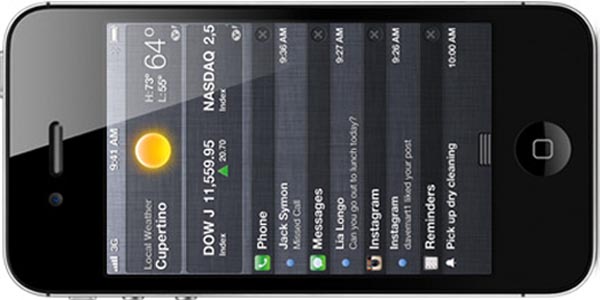
The iPhone 4S is operated by iOS 5, which is the latest edition of Apple’s mobile software. In iOS 5 you get the same basic feel but with added features and aspects.
iPhone 4S Processor

The iPhone 4S features a bigger processor to the iPhone 4 in the form of the A5 chip. And it sure feels really efficient, with applications being launching instantly, navigation and speedy typing giving instant response to every single tap.
iPhone 4S Camera

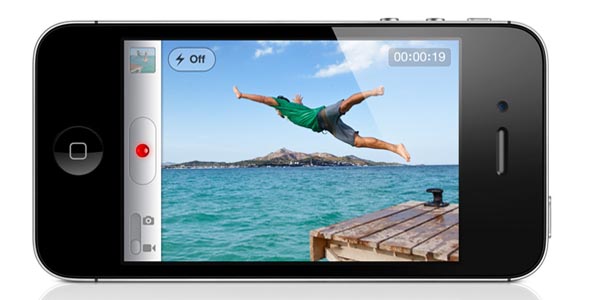
The iPhone 4S equips a new 8 MP shooter which has optic tech, as well as face-detection feature, rear illumination (titter) and a new sensor. As far as image quality is concerned, we were pleased with the iPhone 4S’s camera, the captured image gave more natural feel than iPhone 4.
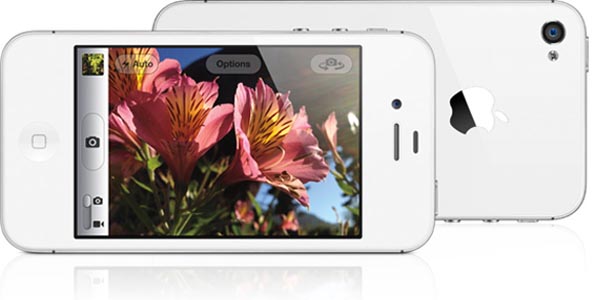
While, the camera of the iPhone 4S provides excellent depth of field. In addition, the 1080p video recording is also very crispy and punchy!

Conclusion

The iPhone 4S is no doubt still leading the smartphone war, but the distance has lessened considerably, with Android and even Windows Phone mobiles becoming gradually more handy and elegant. Reviewing the whole mobile industry from different angles, we’re not sure if the iPhone 4S helps to maintain the leadership of for another whole year or not. But we sure can say that iPhone 4S is the best smartphone to date. Click here for reviews and cheap deals.
No related posts.

Tuesday, July 3, 2012

on Leave a Comment

Android 4.1 Jelly Bean coming mid-July, optimized with Project Butter

By r.Somesh Bhardwaj
On June 27, 2012, 12:49 PM EST Breaking News
Google has unveiled the successor to Android 4.0 Ice Cream Sandwich at their annual Google I/O Conference. Android 4.1 Jelly Bean arrives just eight months after ICS was released despite the fact that a large number of Android devices still haven’t received the 4.0 update.
Engadget was on hand for the event, noting that Jelly Bean isn’t as big of a revolutionary step as moving from Gingerbread to ICS, but there are some pretty significant changes that Android users can look forward to. The most important of these is Project Butter, an initiative to improve the overall speed and performance of the mobile operating system.
Jelly Bean with Project Butter makes the entire user interface fast and fluid. The system uses triple buffering in the graphics pipeline to maintain consistent frame rates, according to The Verge. Furthermore, the CPU will ramp up to full power the instant a touch command is detected to avoid lag that typically occurs when a processor is in low power mode.
Two Galaxy Nexus handsets were compared side-by-side, one running Ice Cream Sandwich with Jelly Bean on the other. The latter offered significantly higher frame rates when cruising through the UI. This is because Jelly Bean operates at 60 frames per second system-wide.
Other new features include Offline Voice Typing which no longer requires an Internet connection and Google Now integration. Google Now can accomplish a number of tasks such as keeping you up to date with your favorite sports team, learning the route you take to work and checking on the status of traffic as well as providing information about public transit whenever you are close to a terminal. There’s also a new keyboard that uses SwiftKey-like prediction to speed up typing.
Google will make Jelly Bean available for the Motorola Xoom, Galaxy Nexus and Nexus S in mid-July. No word yet on when the OS will reach other Android handsets.

on Leave a Comment

How To Change IBM Mainframe TN3270 Password?

5digg 
TN3270 Plus is a flexible, efficient and inexpensive terminal emulatorapplication for connecting Windows PC users to IBM zSeries (mainframe), IBM iSeries (AS/400), UNIX and other Windows systems via TCP/IP.In this tutorial I will show you how to set new password in IBM mainframe TN3270. Usually 90 days once the TN3270 password should be reset else the password will expire.
Steps to set New Password in TN3270
1. Start TN3270 client software.
2. Enter the “Userid” i.e your username maybe 3 or 6 letter logon ID.
3. TAB down to the “Password” field and enter the current password.
4. Enter your new password in the “New Password” fields as shown below.
How To Change IBM Mainframe 3270 Terminal Password
5. Press the ENTER key.
6. You should then see a message that your password has been successfully changed.
That’s it :)  Your password is changed
on Leave a Comment

See How Google ‘Zerg Rush’ Easter Egg Invades Your Search Results

Zerg Rush - Google Easter Egg

“Zerg Rush” is Google’s latest Easter Egg, and it’s first StarCraft-inspired one. Just enter Zerg Rush ingoogle search box and hit enter.Hordes of red and yellow Google O’s will descend on your search results. You have to click them to knock down their HP before they defeat your search results.
After every search result gets wiped out, and they will get wiped out, you’ll be assigned a score which you can then share on Google+. Google tracks the user’s actions per minute (APM) and zerg kill count in a score box on the far right of the screen. Once all of the search results have been eaten by zergs, the enemies gather at the top of the (almost) blank page to form two Gs. My score the first time around was 16 zerglings taken down with 56 APM (attacks per minute).
on Leave a Comment


Increase Your Iphone Battery Life With These Easy To Use Tips

4digg 
Increase Your Iphone Battery Life With These Easy to Use Tips
If you are an iPhone users then you must be aware of the less point of Apple’s iPhone is its Battery. With every usage of it the %age of battery decreases. Iphone offers its users whole new world of features, apps, games which cannot be resisted from exploring. But the main concern for the user will be saving the battery throughout the day. Maximum iPhone battery is 100% and it rapidly decreases according to the usage.
But every problem has a fix to it and Apple has done that for the battery issue. So let’s explore these few simple and few little tricky ones to get that extra bit of battery.
When Not in Use Turn off Your iPhone All Wireless Applications
All the latest phones, being specific Smartphone come with inbuilt wireless applications like Bluetooth and wifi access. So it is advised to switch off such features when they are not in use. As these features tends to deplete your iPhone battery fast. So turning them off can help you extend the battery life for several hours.
If not required then disable the 3G as well. As the 3G technology survives on the battery of the phone. If possible to turn off it will give you long battery life for whole day.
Make use of the auto brightness feature of your iPhone. This will automatically adjust the back light of IPhone as required. This adjustment also helps in saving battery.
Manually Lesser The Screen Brightness
Although you have enabled the auto brightness feature but in some scenarios it does not dim the light as required. There you can manually lower the brightness of the home screen for saving of the battery. Preferred is to keep your brightness to 49% to make optimum use of the iPhone battery.
End Background Apps
According to Apple, the background apps are not technically ‘running’, unless they are front and centre, which means they should not draw any power.
The multitasking application for the iPhone continues to use resources of system more efficiently depletes your battery.
Applications, for example, Skype or even other VoIP can be especially benefit from the battery when you perform within the setting and so it is better to start launching the applications only when you need which can save the battery life.
Cool Off The IPhone Temperature
High temperature of iPhone also eats up its battery life. If you find that while charging your phone the temperature is increasing, then remove the phone cover before plugging in for charging. Let it also have a breath of fresh air so place it on a table or in open space instead of your pocket. The optimum temperature for iPhone and its battery is between 32°F to 95° F.
Make Use of Solar Chargers
Solar chargers give you freedom of charging your iPhone from anywhere. So if your battery is dying out, you can save it with solar power.
Also another advantage is that you can follow the motto “Go green” while saving the electricity which in turn protects the environment.
Frequently Use your iPhone:
We all know that iphone is a precious thing for anyone but that does not mean that you restrict its use to protect it from daily wear and tear. It is best valued with optimum use of it. Not using the iPhone for a long time can reduce its battery life. Therefore one should use it regularly and change iPhone battery at least once every 6 months.
Apple has also strongly recommends that you should charge your iPhone when the battery is completely finished i.e. 0%.
So follow these tips and you can easily save your iPhone battery life and enjoy it for long.
If these tips don’t work it may be time for your IPhones battery to be replaced. For great deals on new batterys or even new IPhones check out Dial-A-Phone.co.uk.
Popularity: 6% [?]
on Leave a Comment

Tips For Maintaining Your Laptop

4digg 
Tips for Maintaining Your Laptop
Nowadays, many people are using laptops for their school work, business or leisure. However, laptops can lose their efficiency if not well-maintained. The following are some tips which will help enhance your laptop usage.
1. Watch out for dust
To ensure your laptop remains effective for a long time, you need to protect it from dust. An accumulation of dust in your laptop could block the ventilation areas and result in overheating. It is therefore very important to keep your laptop from being exposed to dust.
2. Keep it cool
Besides dust, it is also very important to protect your laptop from excessive heat. A laptop used in a cool, dry area will work more effectively and faster than if it was exposed to heat. To protect your laptop from overheating, avoid using it on your lap, bed or cushion since this will block the vents underneath which help in cooling. The best solution for this is to use a lap tray as a base for your laptop. Alternatively, you can invest in any of the laptop coolers which are sold in most computer stores.
3. Install a firewall and antivirus software
If you don’t use any antivirus, your laptop remains vulnerable to being infected by a virus. Make sure you use proper antivirus software to protect your laptop and keep it effective for longer. You should also installa firewall so as to restrict access to your laptop. A firewall will alert you anytime an external entity tries to access your laptop. You will then have the option of either blocking or allowing access. In addition, you need to be cautious about using external hard disks and flash disks with your laptop.
4. Eliminate unused programs
At times, you might have some programs in your laptop that you don’t really need. It is advisable to uninstall them so as to create more space in your hard drive. This will enable you to install other important applications and programs. Eliminating unused programs will also improve your laptop’s performance and make it easier to locate important files.
5. Defragment hard drives
When you have many programs in your laptop, it will take time to locate your important files. It is therefore very vital to defragment your drives frequently. Defragmenting will arrange your files in a way which makes them much easier to access.
6. Clean your registry
Once in a while, registry files might get corrupted thus resulting in a drastic and sudden change in your laptop’s performance. Make sure you run your registry cleaners frequently to find out if there are any corrupt files or errors.
7. Minimize programs to run during startup
Whenever you start your laptop, it will load all the system files, as well as the programs which have been selected to run during startup. The more programs you run, the longer it takes to startup. You should therefore minimize the number of programs that will run during the booting process.
8. Delete temporary internet files
Slow browsing speeds are often as a result of poor internet connection. However, in some cases, it might be due to too many temporary internet files saved in your laptop. You should therefore take time to delete such files from your laptop.
9. Empty the recycle bin
When files are deleted from your laptop, they end up in the recycle bin. This means that they are not actually deleted from the laptop; they have just been transferred to a different location. Thus, they still take up space in your hard drive. It is therefore important to empty your recycle bin as often as possible.
10. Power surge protection
Power surge protection is as important for laptops as it is for desktop computers. Replacing a laptop power supply is very costly compared to investing in a power surge protection device. Make sure you get one so as to protect the laptop itself, as well as your laptop power supply.
About Author:
Charles Mburugu has a passion for sharing tips for laptop and computer users. He is currently involved in a campaign promoting deals such as skin it discount codes and hp store coupon codes. He also writes on web-based technologies such as social media.
Popularity

Sunday, July 1, 2012

on Leave a Comment

How to Create an Invoice Using Your Paypal Account


                         How to Create an Invoice Using Your PayPal Account


If you have an online business and you give quotes to your customers for custom jobs then you probably use some form of an invoicing system to collect the money from the customers.
You have most probably used or are currently using PayPal in some capacity to receive payments for your products or services. PayPal is the most popular payment gateway for online merchants and consumers alike and is used by tens of millions of people to sell products from their websites.
Apart from giving you the ability to accept payments from customers via “Add to Cart” or “Buy Now” buttons on your site, PayPal also has functionality which makes it possible for you to create and send invoices directly from your PayPal account.
The invoice functionality offered by PayPal is free and is a somewhat overlooked and seemingly little known feature.
PayPal’s invoicing feature can be a very useful tool for anybody who wishes to request a payment from someone in a professional manner. This is in contrast to the simpler “Request Money” feature which is also available from your PayPal account and which allows for a basic message requesting payment to be sent to anybody with an email address.
As we’ll see in the example below, with the PayPal invoicing feature, you can tailor your invoices to look official and professional and hence add that extra touch of quality to how you request payments from your clients.
The added beauty of using PayPal’s invoices is that they not only allow people to pay you using their PayPal account, but they also make it possible for people to send money even if they don’t have an account with PayPal but they simply want to pay using their credit or debit card.

 A Step by Step Guide on Creating a PayPal Invoice


Powered by Blogger.